
Lightning Mobile — High-Performance Mobile Automation Platform (React Native + iOS TestFlight)
Overview
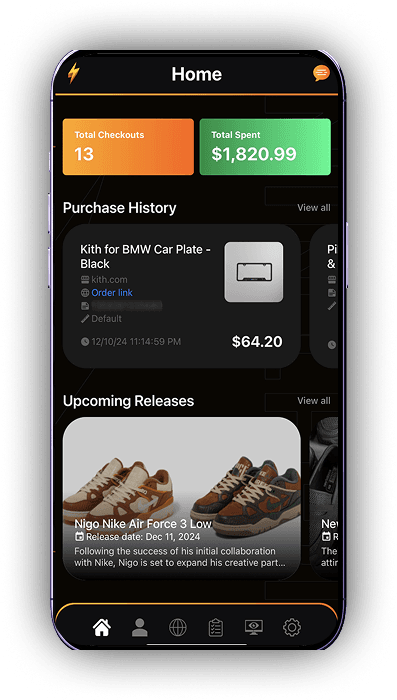
Lightning Mobile is a powerful mobile companion app built to extend the Lightning automation ecosystem into iOS. Designed for data-heavy workflows and real-time monitoring, the app delivers a seamless mobile interface where users can manage profiles, track monitors, customize automation actions, and receive instant push notifications — all optimized for speed, clarity, and reliability on iPhone.
The Challenge
Mobile automation introduces additional constraints, especially on iOS where background activity, networking, and browser behavior operate differently than desktop environments. The challenge was to recreate the core Lightning experience — monitors, actions, profile management, notifications — inside a clean, responsive mobile UI. The app had to remain performant while rendering large amounts of real-time data, support user authentication, and synchronize sessions across devices.
Project Goals
- ✔ Build a fast, responsive React Native mobile UI for data-heavy automation workflows
- ✔ Replicate key Lightning features (profiles, actions, monitors, settings) for mobile
- ✔ Support seamless iOS deployment through TestFlight
- ✔ Ensure synchronization with the desktop extension ecosystem
- ✔ Integrate secure authentication and license validation
- ✔ Optimize list rendering, socket connections, and data updates for smooth performance
- ✔ Provide instant real-time notifications and activity tracking
Process
Architecture Planning & Data Flow Design
Mapped out how Lightning’s existing automation infrastructure would translate into a mobile-first experience. Designed predictable state flows, caching layers, and socket connections to ensure smooth data rendering even under heavy workloads.
React Native UI Development
Built Lightning Mobile using React Native with a clean, modern interface optimized for fast scrolling, modal workflows, and high-frequency data updates. Focused on clarity and usability for users managing multiple tasks.
Profile Management & Custom Settings
Implemented the same powerful profile system from the desktop version — including metadata fields, checkout preferences, and automation rules — all optimized for smaller screens.
Monitor Feed Integration
Connected Lightning Mobile to real-time monitor feeds, enabling users to track restocks, product cues, and automation triggers directly from their phone with minimal delay.
Actions & Automation Controls
Recreated the Actions system to allow users to configure automation sequences, checkout logic, and delays from within the app — synced across all logged-in devices.
Push Notifications
Integrated instant push alerts for restocks, checkpoints, license updates, monitor triggers, and account changes, giving users full awareness even when the app is closed.
Authentication & License Security
Built secure login flows, token validation, and license sync logic ensuring the mobile app stays in sync with the user’s active Lightning subscription.
TestFlight Deployment
Configured signing, provisioning profiles, and iOS builds. Deployed the app for beta testing through TestFlight with performance monitoring and crash analytics.
Results
- ▲ Full Lightning experience successfully brought to iOS
- ▲ High-speed data rendering optimized for mobile
- ▲ Real-time automation monitoring from anywhere
- ▲ Seamless syncing with desktop extension and user accounts
- ▲ Push alerts significantly improved user response times
- ▲ Smooth TestFlight deployment enabling team-wide testing
“Lightning Mobile unlocked a completely new level of accessibility for our users. The speed, clarity, and reliability make it feel like a native part of the ecosystem — exactly what we hoped for.”
— Lightning ATC Team